Runs locally, as you
It runs on your computer with your kubeconfig and the NRP's own sign-in. It never reads or stores your token, and nothing leaves your computer except the Kubernetes calls you approve.
nrp-mcp is a small MCP server that runs on your own computer. Point it at your Nautilus sign-in and it turns "here is my code, run it on a GPU" into a reviewed plan and a running job. It knows the NRP's rules, so you don't have to learn Kubernetes first.


python train.py. A100s need a quota you don't have, so this asks for any free standard GPU. Run it?Each tool is named for what you want rather than for Kubernetes objects. Every result starts with a plain-language summary and, where useful, the kubectl equivalent so you learn as you go.
It runs on your computer with your kubeconfig and the NRP's own sign-in. It never reads or stores your token, and nothing leaves your computer except the Kubernetes calls you approve.
Planning creates nothing. You see the image, size, decisions and manifests first. Running and cleanup need a single-use token bound to the exact plan, valid for 10 minutes.
Non-sensitive data only, Jobs instead of sleep loops, limits within 20% of requests, quota-gated GPUs and more. A plan that breaks a rule is refused, with the reason and the fix.
"Run it 200 times with different seeds" becomes an Indexed Job. #SBATCH lines are translated, and a Slurm array script runs unchanged with its array variables set per task.
Plain-language diagnosis with a fix: out of memory, no free GPU, quota, image pull, crashes. Progress and logs with tail and grep.
Private Jupyter or VS Code sessions through port-forward, in-cluster dataset downloads to a shared volume, and lab tools on HTTPS, published only after your approval code and expiring after 14 days.
nrp-mcp setup installs kubectl and kubelogin into your user folder (SHA256-checked, no admin rights) and signs you in. CI installs and checks them on every change on all three systems.
Run nrp-mcp client <name> once for Claude Desktop, Claude Code, VS Code, Cursor, Gemini CLI, OpenCode or Hermes Agent.
Six are read-only. The rest change things only as listed: with a flag, your approval, or a confirm token.
| Tool | Changes things? | What it does |
|---|---|---|
nrp_guide | no | Walks you through step by step: checks your computer, sign-in, namespace, saving results and your runs, and tells your assistant the next step and the question to ask you |
nrp_setup | only with fix=true | Laptop readiness: kubectl (version vs the cluster), kubelogin, NRP config, sign-in; installs or updates them with your yes |
nrp_status | no | Identity, namespaces, GPU quotas, workloads and what they ask for, volumes, public URLs, warnings |
nrp_plan | no | Inspects a project and a goal (job, sweep, web, session, llm-batch, volume, pull), applies every rule, returns a summary, decisions, refusals, the files it will copy and skip, and either a confirm token or needs_person_approval |
nrp_run | yes, after you approve | Runs an approved plan: risky plans (web, GPU) after the person approves (question or code), low-risk plans with a token; writes a private run card to <project>/.nrp/runs/ |
nrp_watch | no | Progress, logs (tail/grep), diagnosis with a fix, public URL check |
nrp_cleanup | yes, two steps | Lists your runs, then deletes one after a second confirm |
nrp_session | no | Readiness, port-forward command and local link for a notebook or VS Code session |
nrp_data | uploads only | List, upload small non-sensitive files, download results from a volume, or a job's saved results with down run=<id> |
nrp_build | no | Suggests a Dockerfile and a GitHub Actions workflow that builds it into ghcr.io (or, with target=gitlab, an NRP GitLab kaniko file); explains public vs private images |
Also served: resources nrp://policy, nrp://gpus, nrp://storage, nrp://llm, nrp://kb, and prompts first_run, port_slurm_script, parameter_sweep, my_job_failed, host_web_tool, teach_workshop.
Your AI client starts nrp-mcp serve and talks to it over stdio. Planning and rule checks are pure, tested code; only the kube step touches the cluster, using kubectl as you.
inspectreads your project folder: language, GPU use, entry point, web app, Slurm scriptplanbuilds manifests from facts + goal (pure, tested)ruleschecks every NRP policy (pure, tested)storeplans, hashed confirm tokens, audit logkuberuns kubectl as you (kubelogin handles the sign-in)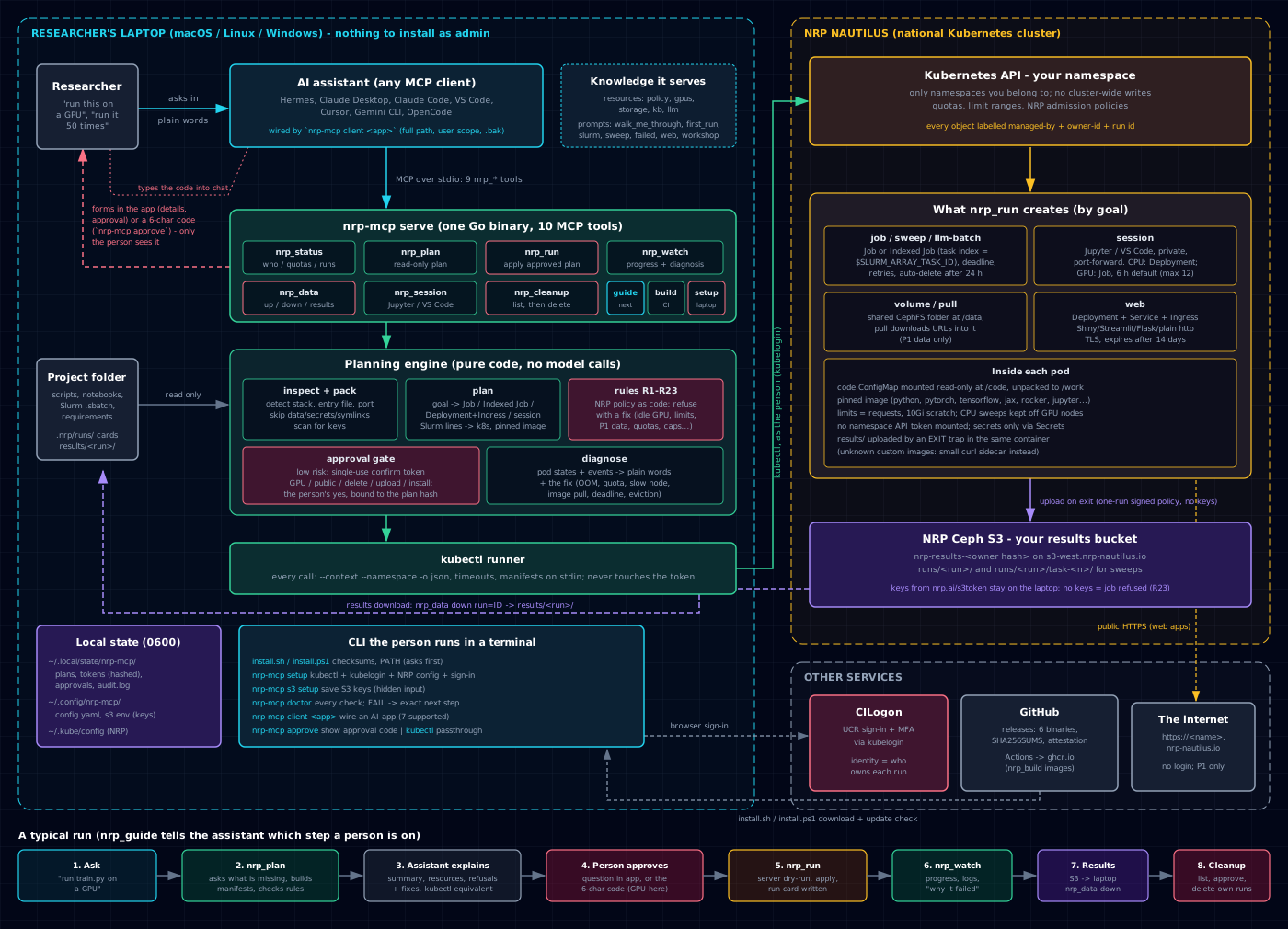
Small projects are copied into the pod as a ConfigMap and their requirements installed at start. Bigger ones get an image: nrp_build writes a GitHub Actions workflow, GitHub builds the image on every push into its container registry (ghcr.io), and nrp_plan image=... deploys it as built. A private image needs pull_secret= (a read-only token stored once in your namespace); a public one needs nothing. The full design, every rule and the test record are in SPEC.md.
From the README's safety section. See SECURITY.md for details and how to report a problem.
Uses your kubeconfig and the NRP's sign-in. Never reads or stores your token.
Public web, GPUs, deleting data and uploading wait for you: a yes in your AI app's own prompt, or a one-time code in a desktop notification. Other runs, and removing a finished run, need your yes and a single-use token bound to the exact plan.
A web plan publishes only after your approval code, and public apps expire after 14 days.
Every object is labelled with its owner; cleanup touches only your runs unless a namespace admin asks for everyone's. Namespace members can still see each other's work, so share one only with people you work with.
On pods and GPUs running at once, tasks per sweep, and hours per run.
Every change is logged at ~/.local/state/nrp-mcp/audit.log.
Read the full one-page guide at docs/START-HERE.md. You need a Nautilus account and a namespace: sign in once at nrp.ai with your institution; students are added to a namespace by their PI at nrp.ai/namespaces, and faculty can request one. UCR researchers: see Getting access.
Linux or macOS:
curl -fsSL https://raw.githubusercontent.com/UCR-Research-Computing/nrp-mcp/main/scripts/install.sh | shWindows (PowerShell):
irm https://raw.githubusercontent.com/UCR-Research-Computing/nrp-mcp/main/scripts/install.ps1 | iexOr download the archive for your OS from Releases, or with Go installed:
go install github.com/UCR-Research-Computing/nrp-mcp/cmd/nrp-mcp@latestAt nrp.ai/config (it lands in Downloads).
nrp-mcp setup
nrp-mcp s3 setup # once: keys from https://nrp.ai/s3token/ (batch jobs need it to keep results)setup checks everything first and asks before changing anything. Then it installs kubectl and the kubelogin sign-in plugin (official releases, SHA256-checked, into your user folder, no admin rights), puts the NRP config in ~/.kube/config (backing up an existing one), and signs you in through your browser. Check readiness at any time with nrp-mcp doctor.
Run nrp-mcp client <name> once in your terminal (writes user-scope config with the full binary path and keeps a .bak backup):
nrp-mcp client claude-desktop # or: claude-code, vscode, cursor, gemini, opencode, hermes| Client | Automatic (nrp-mcp client) |
|---|---|
| Hermes Agent | nrp-mcp client hermes (~/.hermes/config.yaml) |
| Gemini CLI | nrp-mcp client gemini (~/.gemini/settings.json) |
| OpenCode | nrp-mcp client opencode (~/.config/opencode/opencode.json) |
| Claude Code | nrp-mcp client claude-code (~/.claude.json) |
| Claude Desktop | nrp-mcp client claude-desktop |
| Cursor | nrp-mcp client cursor (~/.cursor/mcp.json) |
| VS Code | nrp-mcp client vscode (User/mcp.json, uses "servers") |
Pass --namespace <your-namespace> to pin a default namespace, then restart your AI client.
"Where do I stand on Nautilus?"
nrp_build) or git.nrp_build suggests files; it doesn't build. Builds run on GitHub Actions (or NRP GitLab).results/ (or new files in /work) are saved to your personal NRP S3 bucket once you run nrp-mcp s3 setup with keys from nrp.ai/s3token.nrp-mcp kubectl ... port-forward) and never public. For zero install, the NRP runs a hosted JupyterHub.setup can't run in CI and is tested by hand.Each shows a realistic conversation with an AI assistant, what nrp-mcp builds, a compute estimate, honest limits, and a starter kit you can adapt. These are illustrations, not case studies: none of these groups use nrp-mcp today, none of these runs happened, and times and costs are stated assumptions. Read the index.
Runnable sample projects live in examples/: leaf-area-explorer (a web app) and slurm-array-bootstrap (an R bootstrap with a --array=0-9 Slurm script).
Nautilus is operated by the National Research Platform (UC San Diego / SDSC). This is a community tool from UCR Research Computing, not an NRP product. Please follow the NRP policies. UCR researchers: see the Nautilus guides.